Communications Devices User Interface
The Comm Devices page in the Universal Interface Service (UIS) pane displays current values and statistics applicable to communication devices. The communication device values and statistics displayed are for those devices configured in an associated Device Definition Service (DDS).
For information about configuring communication devices, see Communication Devices.
Context Menu Options
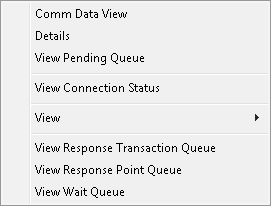
The following table lists and describes Comm Devices context menu options.
|
Comm Devices Context Menu Options |
| Option | Description |
|---|---|
|
Comm Data View |
Click to view the Communications Data Viewer, which is a client-side logging tool for troubleshooting remote device communications. It provides a method to view data transmitted between the host and field devices, and to save the data to a file for off-line analysis. |
|
Details |
Click to view a detailed report for the selected device. You can also access the device configuration from the resulting dialog box. See Device Details. |
|
View |
Click to display options to view the Remote Devices, Comm Devices, Import/Export Devices, and Current Values pages. |
|
View Connection Status |
Only appears as an option for TCP/IP MultiPoint communication devices. Provides information about destination addresses and other applicable information. |
|
View Pending Queue |
Click to display the pending queue for a specific communication device. |
|
View Response Point Queue |
Click to display the response point queue for this UIS. |
|
View Response Transaction Queue |
Click to display the response transaction queue for this UIS. |
|
View Wait Queue |
Click to display the wait queue for this UIS. |
Values and Statistics Displayed
The following table lists and describes Communication Devices values and statistics.
| Column | Description |
|---|---|
|
Comm State |
Indicates the operational state of the device. Values include the following:
|
|
Cryouts |
Displays the number of currently active cryouts. Cryout statistics only display for a remote device using a Cryout Listen EIE and for the connected Cryout Listen EIE itself. Corresponds to the SYCSCRY system UDC. |
|
Device ID |
Displays the communication Device ID as it is configured in the DDS. Corresponds to the SYDEVCOMID system UDC. |
|
Failed Msgs |
The total number of messages sent by the UIS that failed for the time period specified. Corresponds to the SYCSFTOT system UDC. |
|
Last Failed Msg Desc |
Displays a description of the latest failed message. May be viewed in more detail from the Communications Data Viewer. Corresponds to the SYCSLFCD system UDC. |
|
Last Failed Msg Time |
Displays the time of the last failed message. Corresponds to the SYCSLFCT system UDC. |
|
Last Succ Msg Desc |
Displays a description of the latest successfully processed message. May be viewed in more detail from the Communications Data Viewer. Corresponds to the SYCSLSCD system UDC. |
|
Last Succ Msg Time |
Displays the time of the last successfully processed message. Corresponds to the SYCSLSCT system UDC. |
|
Pending |
The total number of messages currently pending for the communication device. |
|
Status |
Indicates the operational status of the device. Values include the following:
|
|
Succ Msgs |
The total number of messages sent by the UIS that succeeded. Corresponds to the SYCSSTN system UDC. |
More:
 Prioritizing Messages in the Communication Queue


